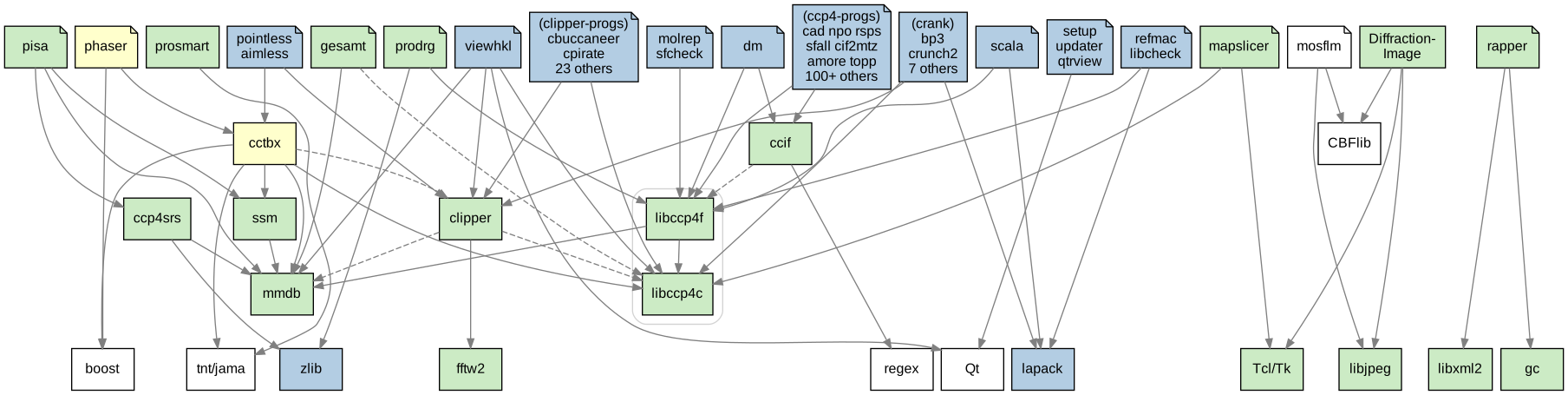
CCP4-JHBuild is JHBuild customized for building CCP4.
JHBuild is Python program that can pull a number of modules from a variety of sources (CVS, Subversion, Bazaar, tarballs...) and build them in the correct order. It was originally developed to build GNOME, but now is also used for a few other projects.
Modules (packages) are downloaded directly from their original sources, patched if necessary, configured, built and installed.
For example, when one asks to build Refmac:
$ ./cj build refmac
first its dependencies are downloaded and built (Lapack is downloaded from Netlib, CCP4 libraries from Bazaar or CVS) and finally Refmac is fetched from Garib's website and built. User can skip compilation of Lapack if it is already installed.
New packages that use popular build systems like autotools or cmake can be easily added by specifying download location and dependencies in the configuration file.
CCP4-JHBuild is intended for developers, but can be used also by users who are familiar with compiling software and want to test a just added feature.
Prerequisites:
There is a separate section below how to setup Windows machine.
In Harwell Campus proxy must be configured:
$ setenv http_proxy http://wwwcache.rl.ac.uk:8080/
$ setenv no_proxy ccp4.ac.uk,rc-harwell.ac.uk
If you have Tcl/Tk with libraries installed either in default system location or in $CCP4I_TCLTK (from previous version of CCP4) you don't have to build it. But if you like to, it is packed conveniently:
$ curl -O http://www.ccp4.ac.uk/weekly/tcltk++_8.4.19.1.tar.gz # (20MB)
$ tar xzf tcltk++_8.4.19.1.tar.gz # (90MB)
$ tcltk++_8.4.19.1/build.sh install # the argument is path for installation
Download "devtools" from bzr:
$ bzr co http://fg.oisin.rc-harwell.ac.uk/anonscm/bzr/devtools/trunk devtools
$ cd devtools/
Check if jhbuild works (list modules available to build):
$ ./cj list -a #or /path/to/devtools/cj ...
If you want to change how source is fetched from repositories (default settings are anonymous checkout from bzr and CVS without explicit username) modify the repos[...]=... lines in ccp4.jhbuildrc.
If you can't install the latest cmake system-wide, build it locally:
$ ./cj build cmake
Then either build default set of CPP4 packages:
$ ./cj build
or build only selected module with dependencies:
$ ./cj build refmac
The list command shows what packages would be built:
$ ./cj list refmac
and the info command shows additional informations:
$ ./cj info refmac
build commands first check for updates in the repository and then does compilation. It is also possible to update sources without building:
$ ./cj update [program]
or to build without updating:
$ ./cj build -n [program]
There are also equivalents of make clean and make uninstall:
$ ./cj clean [program]
$ ./cj uninstall [program]
To build a module without dependencies, replace build with buildone. The same with update/updateone and clean/cleanone.
The build command creates three directories (checkout, build and install) in the current directory. They are used for, respectively, downloads, building and installing. These locations can be changed in ccp4.jhbuildrc.
All JHBuild commands can be listed with:
$ ./cj help
Some of them do not work with CPP4 module set yet.
Option --help shows details about each command:
$ ./cj rdepends --help
Some CCP4 programs expect data in lib/ and lib/data/ directory. In Linux Filesystem Hierarchy Standard as well as in BSD/Darwin hierarchy architecture-independent data go to share/ (see man hier). A few libraries have been changed to respect it and for now symbolic links are used to make all programs work:
$ ./symlinks.sh install-dir
You can run the newly compiled version without uninstalling other CCP4 versions and without setting any variables, but it must be started using:
$ ./run-ccp4.py install-dir
This script internally changes environmental variables (without affecting other CCP4 versions) and offers to start either ccp4i or a new shell.
Warning: not tested well.
Update devtools, then update and compile modules:
$ bzr update
$ ./cj build
It is possible to compile the suite on Windows or to cross-compile it for Windows on other system. In both cases we use MinGW (port of GCC).
C library used by MinGW has no regex. mingw-libgnurx is a possible replacement. It can be downloaded manually or, on some Linux distros, installed from repository (on Fedora and OpenSuse: mingw32-libgnurx*).
Bash or similar shell with basic Unix tools is needed to run autoconf-generated configure scripts. Below we describe three setups.
The easiest way install MinGW with MSYS is probably mingw-get-inst.
Install necessary packages:
$ mingw-get install mingw32-gcc mingw32-gcc-fortran mingw32-gcc-g++ \
                    msys-make msys-wget msys-openssh msys-cvs \
                    mingw32-libz
mingw-libgnurx needs to be installed manually, as described above. .h file goes to include under C:\MinGW, .a to lib and .dll to bin.
Outside of MSYS install CMake, Python 2.x and Bazaar (Python-based installer will do, but for 64-bit Python see recent comments here). Make sure all three are in PATH, e.g. add to ~/.profile:
PATH=$PATH:/c/Python27:/c/Python27/Scripts:"/c/Program Files (x86)/CMake 2.8/bin"
export PATH
Note
MSYS shell allows to specify paths in many different ways. For example /home, /c/MinGW/msys/1.0/home, C:/MinGW/msys/1.0/home and C:\MinGW\msys\1.0\home point to the same directory. MSYS is converting paths that are passed between MSYS and non-MSYS programs, using heuristics to decide which strings are paths. Since paths are passed a lot between shell (MSYS), Python (non-MSYS), CMake (non-MSYS), make (MSYS), compilers (non-MSYS) and other programs during the build, the whole thing is fragile.
Make/libtool fail if checkoutroot (configuration variable) is outside of the MinGW directory (C:/MinGW by default).
When environment variables go through Python they are converted to uppercase, and wget ignores *_PROXY variables, so if you are behind proxy you need to additionally configure it in ~/.wgetrc. In Harwell add lines:
http_proxy=http://wwwcache.rl.ac.uk:8080/
no_proxy=ccp4.ac.uk,rc-harwell.ac.uk
Thanks to automatic path conversion in MSYS, it is even possible to run unix tests.
MinGW compiler can be used under Cygwin in the similar way as on Linux:
$TARGET=i686-w64-mingw32 ./cj build clipper-progs
The point of using MinGW rather than cygwin compiler is to build programs that can be run natively on Windows.
All modules but cctbx can be compiled. I don't have plans to investigate why cctbx does not compile here.
Use the same commands, but set environmental variable $TARGET to the prefix of cross-compiler, e.g.:
$ TARGET=i686-pc-mingw32 ./cj build
By default, directories for building and installing are build-$TARGET and install-$TARGET.
Some build scripts (e.g. these in ccif and libccp4) run programs to generate data files. These programs can be run using wine. On Linux wine is used automatically if binfmt_misc is enabled and configured. (On some distros it is enough to install wine package). In case of dynamic linking wine must know the path to MinGW DLLs.
List of modules is stored in ccp4.xml (if you open modules file as XML in browser, it is presented using custom XSL).
Most of settings in ccp4.jhbuildrc, such as source, build and install paths, number of parallel jobs (jobs=N) and compiler flags (set via env. variables) can be customized. If $HOME/.cjhbuildrc exists, settings from there are also applied.
Other files and directories:
Marcin (wojdyr@gmail.com) or CCP4 helpdesk (ccp4@ccp4.ac.uk).